
Standard Metadata and Structured Data Markup
The site frameworks output standard metadata properties in the head of each page. The values of these properties are taken directly from the content of your article.
Unfurling describes the behaviour of link previews when links to your site are shared. Everything you ever wanted to know about unfurling (opens new window) is a good general guide written by the developers at Slack.
Metadata Properties
Without any modification the frameworks output the following:
<meta name="description" content="Summary text">
<meta property="og:type" content="website">
<meta property="og:title" content="A default article - demo">
<meta property="og:description" content="Summary text">
<meta property="og:url" content="https://demo.gossinteractive.com/article/782/A-default-article">
<meta property="og:site_name" content="GOSS Demo">
<meta property="og:image" content="https://demo.gossinteractive.com/image/1/Test-Image-1/opengraph.jpg?m=1466430411000">
<meta property="og:image:width" content="1200">
<meta property="og:image:height" content="630">
<meta name="twitter:card" content="summary">
<meta name="twitter:title" content="A default article - demo">
<meta name="twitter:description" content="Summary text">
<meta name="twitter:image" content="https://demo.gossinteractive.com/image/1/Test-Image-1/twittercard.jpg?m=1466430411000">
<meta name="twitter:image:alt" content="Test Image 1">
The three
The
The
Images
The various
Most social platforms that perform unfurling recommend an image that has roughly a 1.9:1 aspect ratio, so we have set the
To cater for the various sizes, we've found it best to create three variants of your website logo. If you're unsure about variants, this short video shows the three used by this site (turn on the captions too).
You can see the variants that the framework has generated for this site:
- https://docs.gossinteractive.com/image/6606/New-Docs-Logo/logo.png
- https://docs.gossinteractive.com/image/6606/New-Docs-Logo/opengraph.png
- https://docs.gossinteractive.com/image/6606/New-Docs-Logo/twittercard.png
There doesn't seem to be a hard and fast rule about which one will be used. At the time of writing, links in Teams use the Twitter image, sometimes X uses the Open Graph image, and Slack uses the
Structured Data Markup
The framework outputs JSON-LD markup in the page source. This is generated automatically from your page content.
Here's the markup for this page:
<script type="application/ld+json">
    {
        "@context": "https://schema.org",
        "@type": "WebPage",
        "name": "Metadata Properties, Unfurling and Structured Data Markup - The Digital Platform Documentation Site",
        "description": "The metadata properties output by the site frameworks, how to override them, and how your site will appear when links to it are shared.",
        "url": "https://docs.gossinteractive.com/article/7500/Metadata-Properties-Unfurling-and-Structured-Data-Markup",
        "image": {
            "@type": "imageObject",
            "contentUrl": "https://docs.gossinteractive.com/image/6606/New-Docs-Logo/jsonld.png?m=1710517240530",
            "width": 1200,
            "height": 630,
            "caption": "The GOSS Documentation Site"
        }
    }
</script>
Custom Metadata Properties
You can relate iCM metadata to your article which will be output in the page source. You could use this to add robots "noindex" meta tags to articles to exclude them from search engine crawlers.
Only values from the properties selected in your subsite configuration are output. iCM metadata is used for a wide variety of different functions so outputting all related metadata would not be appropriate.
Setup
In your Subsite Configuration, pick the properties that hold the values you'd like to output:
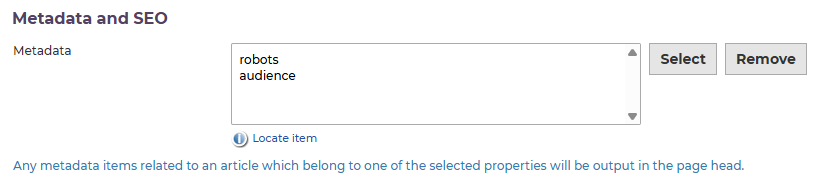
Next relate values from those properties to your article.
For example, an article with two metadata values related to it, one from each of the properties above:
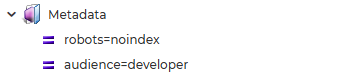
Has the following added to the page source, with the property providing the name and the value the content, like this:
<meta name="robots" content="noindex">
<meta name="audience" content="developer">
Sitemaps and noindex
If you are excluding articles from search crawlers you might also want to exclude them from your sitemap. See "Excluding Articles" in sitemaps for how to do that.
Overriding Values
This isn't currently a standard feature of our templates, but the documentation has been kept for reference.
The titles, descriptions and image can be overridden using article extras.
The "SEO" article extras can be added to any template extension form and the site framework will recognise the settings and output the updated properties.

The "Document title" field accepts the tokens [articleheading], [subsitetitle] and [subsitename].
For developers with access, the snippet is available from the iCM resources bundle. The three field names are DOCUMENTTITLE, DOCUMENTDESCRIPTION and DOCUMENTIMAGE.
Sitemaps
Your site's sitemap.xml lists all of the published, public pages on your site. It is available at [site.url]/sitemap.xml. For example, the sitemap of this site can be found at https://docs.gossinteractive.com/sitemap.xml
Our sitemaps conform to the standard sitemap protocol (opens new window) expected by search engines like Google (see Google's support page at https://support.google.com/webmasters/answer/183668). They are not styled and appear as an XML document.
Which Articles?
The sitemap is built from the platform's article search collection. It includes all of the live non-secured articles on your site that have been indexed by the site search. Articles beneath "hidden" articles are included, as are articles that are otherwise hidden from the main content structure and navigation.
Just to stress again, the sitemap will include links to every single article, unless an article is in a secured area, is excluded from the search with a -10 search boost (see Article Search Optimisation) or has display properties set which would return a "404 page not found" result.
Excluding Articles
Articles can also be excluded by relating metadata to them. The standard metadata group (found in the goss/sitemap group of the metadata library) includes an "exclude" property with two values.
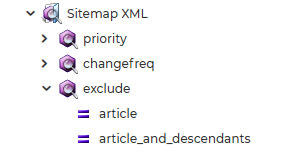
- article excludes the article it is related to
- article_and_descendants excludes the article it is related to and all articles beneath it in the content tree. Note that because the sitemap is built from the platform's search collection, this value won't work if the article is itself excluded from your search (for example, it's switched off)
Robots Metadata
If you are excluding articles from your sitemap you might also want to exclude them from search crawlers using "noindex" metadata. See "Adding Additional Properties" in custom metadata for how to do that.
XML Tags
The standard sitemap includes the compulsory
<url>
    <loc>https://docs.gossinteractive.com/article/5773/Resources</loc>
    <lastmod>2019-01-29</lastmod>
</url>
The optional
For example, adding these two values to an article:
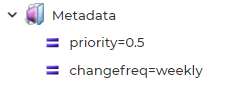
would change the XML above to:
<url>
    <loc>https://docs.gossinteractive.com/article/5773/Resources</loc>
    <lastmod>2019-01-29</lastmod>
    <priority>0.5</priority>
    <changefreq>weekly</changefreq>
</url>
Whether search engines and crawlers respect these values is outside of our control.
How It Works
The sitemap.xml is generated using a SOLR query. The root article of the current subsite is taken as the starting point.
The three metadata properties in the sitemap metadata group have search fields set as:
- SITEMAPXMLPRIORITY
- SITEMAPXMLCHANGEFREQ
- SITEMAPXMLEXCLUDE
When metadata values from these properties are related to an article, the search index entry of that article holds those values in its dynamic "OBJECT_SF_*" fields. It is these search fields that identify the metadata values as "special" and part of the sitemap configuration.
The
Example Metadata
The standard sitemap metadata should already be present in your iCM metadata library, found in the goss/sitemap group.
Search Engine Optimisation
Search engine optimisation (SEO) has spawned an entire industry of advisers and "experts" who try to game the big search engines to make your website appear higher up the list of results. Most of their advice, or at least the stuff that works, is really easy to do and can be found on Google's own help pages.
Remember, search engines want to display your content. They take it, without paying you a penny, put links to it on their website, and make money by placing adverts next to it. Search engine optimisation is about helping search engines understand and present your content - and nothing more.
Great Content
You should build a website to benefit your users, and any optimisation should be geared toward making the user experience better.
In truth, the best way to optimise content for search engines is to write great content. According to Google "when Googlebot crawls a page, it should see the page the same way an average user does". By great content we mean using properly structured headings, writing content that is easy to read, keeping content up to date, using good descriptions, and properly marking-up your images.
Content that is great for SEO is also content that is great for accessibility.
Secure Content
All websites should be using https - and the public websites we host do!
Mobile Friendly Content
Google have had a strategy of "mobile-first index" since 2016. According to their webmaster blog "if you have a responsive site... where the primary content and markup is equivalent across mobile and desktop, you shouldn't have to change anything".
All of our standard themes are mobile responsive.
Proper Headers
Structure your content using headers. Properly nested headers are good for SEO and accessibility and iCM will warn you if your headers aren't properly structured. See the Creating Accessible Content article for more information.
URLs
Google recommend using a "simple URL structure" and iCM does this by default. They give an example: "The URL http://www.example.com/green-dress.html is much more useful to us than http://www.example.com/greendress.html. We recommend that you use hyphens".
If you take a look at the URL of this page you'll see it uses the article heading, separated by hyphens.
Your headings should accurately describe the page, be unique, and be "brief but descriptive".
Canonical URLs
Our frameworks set a canonical URL for each article in the page HTTP response header. The canonical URL uses the
Navigation and Structure
Google give this example as a good way to structure a site:
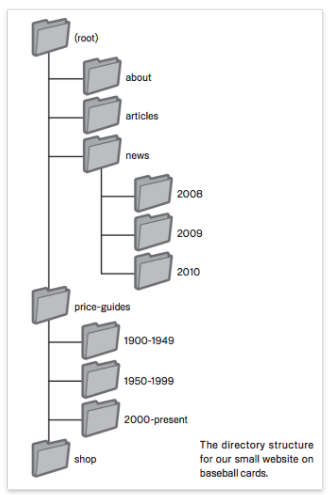
Unlike some CMS providers where your article content is created in one great blob and you have to manually construct navigation using various tags and other black magic, iCM uses an article tree, which looks remarkably similar to Google's example:
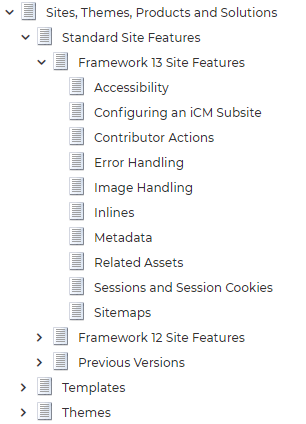
Your site's navigation is built directly from that article tree - a real "what you see is what you get".
Breadcrumbs
Breadcrumb trails are a helpful way for search crawlers to understand how your content fits together. All of our standard themes include a breadcrumb trail and it is built directly from the structure of the article tree.
Meta Descriptions
Metadata descriptions appear in your page source and tell search engines what a page is about. They may also be used as snippets of text in search results (Google are a bit shady about this and can use content from elsewhere on the page, depending on the search query).
Our sites output meta descriptions in the page source. Here's the example on this page:
<meta name="description" content="We're often asked about SEO. This article describes all of the good things our sites do automatically and offers some advice about the content you create." />
Meta descriptions are taken from your article summary text:

If your article doesn't have any summary text, the description falls back to the intro text. What makes this so simple is that it's exactly how lots of the templates on your website work too. The Search template displays article summary text in results, the List template displays article summary text beneath each heading, so your articles will already be outputting meaningful meta descriptions just by you writing great content.
Other Metadata
You can manipulate the metadata your site outputs, overriding titles and descriptions for specific articles, and creating additional properties that will be added to the page source.
See the custom metadata article for more information.
Robots and Crawlers
You can manage your robots.txt file from inside iCM. It's one of the fields in the subsite configuration. The robots.txt file is generally used to prevent an entire subsite from being indexed by search crawlers.
If you want to exclude individual articles from search engine indexing you could create a "robots" metadata property in iCM, with the value of "noindex" and relate that to your articles, as described in custom metadata.
Sitemap
Our sites automatically generate sitemaps that you can submit to search engines. They follow the industry standard sitemap protocol that search engines expect.
Other Free Tools
Google Search Console offers lots of ways you can manipulate how Google recognises and reacts to your site, without having to do strange things to your site.


