
Components
The subscriptions product is made up of the following elements:
- An object type, used to store subscription information for a user
- A configuration end point
- A set of end points, one of which is scheduled to send out emails
- A form, copied per subsite, that enables users to manage their subscriptions
- Templates for the emails in Comms Template Manager
- Metadata to tag articles with
Configuration
Configuration is held in a single end point at
An annotated example can be found at
Properties
| Name | Type | Description |
|---|---|---|
| ctm | Object | The comms template manager application and variations to use. The default application name is "Subscriptions" and the two variants are "Alerts" and "PIN" |
| Object | Each key in this object is a named subsite and its value an object which defines various email settings | |
| email.subsiteName | Object | An object with the following properties, and subsiteName the internal name of the subsite:
|
| image | Object | An object with the single property "constraint". This provides resize instructions when fetching article information and can be used in your email templates |
| metadata | Object | See below |
| object | Object | An object with the single property "type". This is the object type used to store subscription data. The default value is "SUBSCRIPTION" |
| schedule | Object | An object with the single property "period". This is an integer and defines the number of days to look back for article updates. Take care to update your end point schedule if you change this from the default 7 |
| user | Object | An object with the properties whose keys are the names of subsites and values the IDs of website users able to access secure content on that subsite |
function(params, credentials) {
    return {
        ctm: {
            application: 'Subscriptions',
            variations: {
                alerts: 'Alerts',
                pin: 'PIN'
            }
        },
        dates: {
            format: 'D MMMM YYYY'
        },
        email: {
            subsitename: {
                address: '[email protected]',
                name: '{Client Subsite} Updates',
                lang: 'EN',
                template: 'Client Subsite'
            }
        },
        image: {
            constraint: "standard"
        },
        metadata: {
            subsitename: [{
                groups: [],
                properties: [{
                    title: 'Property 1',
                    property: 1
                }, {
                    title: 'Property 2',
                    property: 2
                }],
                parent: {
                    id: 1234,
                    title: 'Latest Group 1 Articles'
                }
            }, {
                groups: [],
                properties: [{
                    title: 'Property 5',
                    property: 5
                }],
                parent: {
                    id: 4321,
                    title: 'Latest Group 2 Articles',
                }
            }]
        },
        object: {
            type: 'SUBSCRIPTION'
        },
        schedule: {
            period: 7
        },
        user: {
            subsitename: 1234
        }
    };
}
Metadata
The metadata defined in your configuration is used to populate the checkboxes on the subscriptions management form, and by the product to work out if an article should be added to the subscriptions email.
The metadata object has the following properties.
| Name | Type | Description |
|---|---|---|
| [subsitename] | Array | Each property in metadata should match the internal name of the subsite for which it is defined, and will be an array of objects, each representing a "subscription group" |
| [subsitename].groups | Array | An array of website user group names. Only users in this group will be able to see these subscription options on the manage subscription form. Leave it empty to all all groups |
| [subsitename].properties | Array | Each object in this array represents a metadata property. Enter a title and the metadata property ID. Each property creates a checkbox accordion on the manage subscription form with the values of the property |
| [subsitename].parent | Object | The title entered here is used in the subscription emails as the heading above links to the new articles. The ID is an article ID. Only articles (with relevant metadata) created beneath this parent will be considered for subscriptions |
Example
Email Templates
Templates in the Comms Manager are used for the sign-up PIN and the alert emails.
Templates
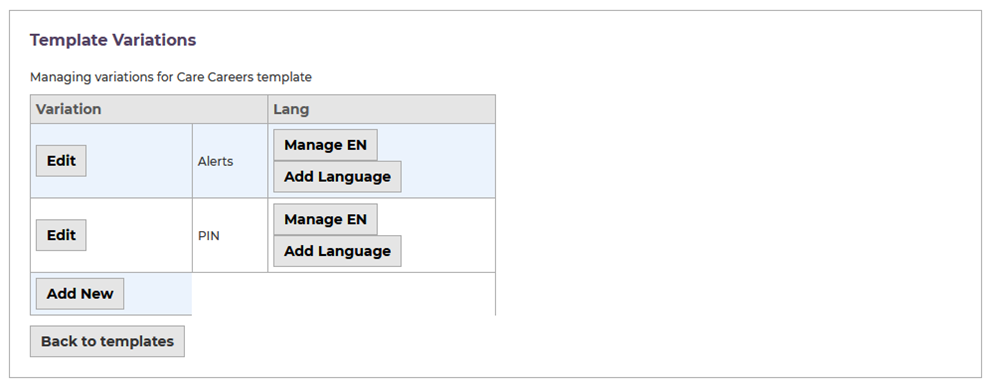
Templates are managed under the Subscriptions application (this name is set in the Configuration).
A template is needed for each subsite that will support subscriptions. In the configuration, the name of the template should be added as the value of the "template" property under each subsite in the "email" section.
Within each template, create a variant for Alerts and one for PIN.
Alerts
When editing the variation for Alerts, the data passed to you comprises:
- an object called
groups , which represents each subscription group (as defined in the configuration) - a string called
subsiteURL , which contains the URL of the subsite (ideal for use in footer links) - a string called
userParams , which contains the user's object ID and email address as URL parameters that you can add as a query string to links so that the user can return to the Subscriptions form without requiring PIN verification
Each group has the following properties:
title - this is the heading text for the group of articles, taken from the parent title property in the configuration, eg "Latest Vacancies")articles - this is an array of the newly created articles returned that match the user's subscription list
The example variation set up for Alerts contains the following block in the body:
{{#each groups}}
<h2>{{this.title}}</h2>
{{#each this.articles}}
<h3><a href="{{this.URL}}">{{this.ArticleHeading}}</a></h3><p>{{this.ArticleSummary}}</p><p>Topics: {{this.Topics}}</p>
{{/each}}
{{/each}}
Here, we loop through groups, output its title, then loop through the articles in the group to output details for those, ultimately giving us all of the articles neatly organised by subscription group (ie new jobs appear under "Latest Vacancies", news appears under "Latest News" etc.)
The properties available for each article are those that would be returned by the iCM API call iCM_obj_articleGet (eg ArticleHeading, ArticleSummary), but with two additional properties added:
URL - this is the absolute URL to the article, and is constructed from the subsite URL and the article IDTopics - this is a list of the subscription topics for the article from the related metadata values, so the user can see what it will have matched for them on
PIN
The variation for the PIN request email only has two data items:
PIN , which is the generated PIN code the user needs to enter to verify their addresssubsiteURL , which contains the URL of the subsite
Creating the Manage Subscription Form
An example form called SUBSCRIPTIONS is included in the installation. This form should be copied and updated for each subsite that will have subscriptions enabled.
Copy and Rename the Form
We recommend naming your form after the subsite it will be used on, for example SUBSCRIPTIONSGOSSDOCS.
Adding Groups and Properties
On the EDIT page you will need to add/update the fields used for the subscription checkbox options.
Two snippets have been provided:
- Subscriptions Group - used to add a whole new group to the form
- Subscriptions Group Property - used to add a new set of checkboxes to an existing group
Fields, Configuration and Naming Conventions
In your Configuration, your metadata properties are organised into groups. Groups define a broad subject area, for example latest news subscriptions, or job adverts. The GROUP layout fields on your form correspond to your configured groups - add one group layout for each. The first layout field must be called GROUP0, the second GROUP1 etc.
Within each group layout are the following fields:
- The "All" checkbox (ALL0)
- The "Refine by" text (REFINE0)
- A vertical accordion for the first property within that group (GROUP0PROPERTY0) which, in turn, contains a checkbox group for the topic values for that property (GROUP0PROPERTY0VALUES)
As you add more groups, the numbers in the field names will need to be incremented. So the "All" checkbox in a second group would be called ALL1, the "Refine by" guidance in a third group would be called REFINE2.
The accordions and checkbox group names work in a similar way. The second accordion in the first group would be called GROUP0PROPERTY1, with a checkbox group called GROUP0PROPERTY1VALUES inside it. The first accordion of a second group would be called GROUP1PROPERTY0, with a checkbox group called GROUP1PROPERTY0VALUES inside it.
In summary, update:
- The ALL([0-9]+) checkbox field name and label
- The REFINE([0-9]+) field name
- The GROUP([0-9]+)PROPERTY([0-9]+) accordion field name and label
- The GROUP([0-9]+)PROPERTY([0-9]+)VALUES checkbox group field name
Scheduled End Point
The
First, it retrieves all articles for a subsite that have a creation date within the schedule period set in the configuration.
Next, it collates a list of all unique metadata value IDs related by those articles, then fetches any user objects whose SUBSCRIPTIONS property contains one or more of the IDs in the that list for that subsite.
Finally, it loops through each of the user objects and checks their SUBSCRIPTIONS property against the related metadata values of each article. Any articles that match for that user are added to the body of an email that is then sent to that user.
Return
Once the endpoint has completed, it will return a structure containing the following:
- success - true, or false, indicating whether the end point completed successfully
- error - if present, this specifies the details of any exception thrown
- subsites - An array of the subsites that were processed by the end point, with each element containing arrays for the articles (IDs) and subscribers (object IDs) that were processed for that subsite, along with emails (object IDs) for subscribers who were sent emails
Schedule
We recommend scheduling the
End Points Overview
As well as the Scheduled End Point to send emails, Subscriptions uses the following, all in the goss.subscriptions namespace.
form.deleteObject
This will delete a single SUBSCRIPTION object, specified by either the object's ID, or the email address of the user who's object it is, and the subsite to which they're subscribed.
form.getObject
This will retrieve a single SUBSCRIPTION object, specified by either the object's ID, or the email address of the user who's object it is, and the subsite to which they're subscribed.
form.getSubscribable
This will return a complete array of all metadata value IDs to which the user can subscribe for a specified subsite.
It is taken from the configuration, organised by groups and properties, and is used primarily to populate the checkbox groups for topics on the front-end form.
form.updateObject
This will create a new SUBSCRIPTION object for a user or update an existing one (if a non-zero object ID is provided as a parameter).
schedule.getNewArticles
This will retrieve all recently created articles for the specified subsite. Articles will be returned if they were created within the schedule period defined in the configuration.
schedule.getSubscriptions
This will retrieve all SUBSCRIPTION objects for a specified list of metadata value IDs and subsite. Objects will be returned if one or more of the IDs in the list is found in the object's SUBSCRIPTIONS list property.
Object Definition
Every subscribed user will have an iCM object of the type SUBSCRIPTION holding their details. It has the following three properties:
EMAIL (required)
The user's email address (to which all alerts will be sent). It is this email address which allows non-logged in users to use subscriptions and is used for matching objects to users who are logged in.
SUBSITE (required)
The name of the subsite to which the user has subscribed
SUBSCRIPTIONS (required)
A comma-separated list of the metadata value IDs of topics to which the user has subscribed
USERID (optional)
Not currently used, but intended for potential future use where we may wish to store the ID of a logged-in user
An object is created for the user when they first subscribe via the form and is subsequently deleted if they choose to unsubscribe from all topics.


